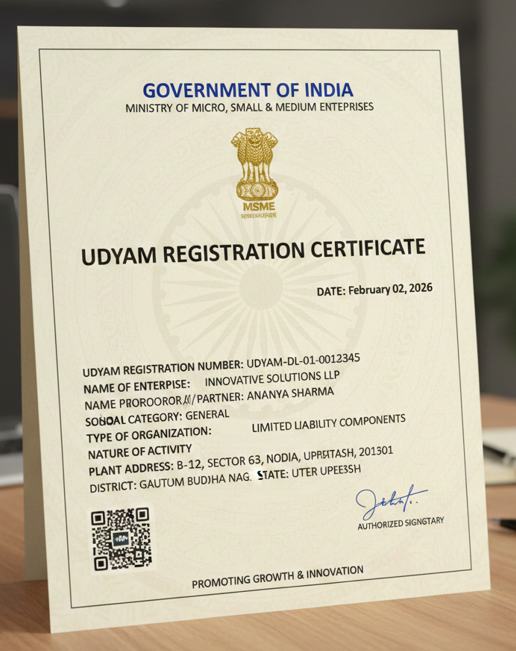

If you want to run a business in India then you have to deal with lots of paperwork. However, one document that stands above all of them is the Udyam Registration Certificate. Whether you are applying for a bank loan, applying for government tender, or want subsidies on your electricity bill, you have to submit a physical copy of udyam registration certificate.
If you have already registered and want to get your certificate, this blog will walk you through the process of how to download and print udyam registration certificates.
Why You Need a Printout of Your Udyam Certificate
While many things are digital today, a physical or saved PDF copy of your Udyam Certificate is essential for:
You might have thought that many things are digital today so why would you require a physical copy of your udyam certificate? Here are some reason to print udyam certificate:-
- Collateral-Free Loans: Banks require a printed udyam certificate to process your loan under MSME-specific credit schemes.
- Tender Applications: Most government and private tenders require a copy of the registration as proof of eligibility.
- Subsidy Claims: To claim benefits like ISO reimbursement or electricity concessions, you’ll need to submit the document to the relevant departments.
- Legal Identity: It serves as a permanent identification number for your enterprise.
Documents Required to Print Your Udyam Certificate
You Don’t Need Any Physical Documents to Print Udyam Certificate but your must have these details to print udyam certificate:
1. Your Udyam Registration Number: This is the unique 16-digit number you received upon successful completion of your Udyam registration (e.g., UDYAM-DL-01-0012345). Keep this handy!
2. A Valid Mobile Number Linked to Your Udyam Registration: For security purposes, an OTP (One-Time Password) will be sent to the mobile number you registered with. This is essential to log in and download your certificate.
3. An Internet Connection and a Device (Computer/Smartphone/Tablet): To access the official Udyam Registration portal.
4. A Printer (Optional, if you only want a digital copy): If you want to have a physical copy of msme certificate then you require a printer.
How to Print Your Udyam Certificate (Step-by-Step)
Printing your certificate using the official udyam portal can be difficult because of technical glitches and OTP error The UdyogRegister portal provides a simplified interface to recover and print your certificate. Here is how you do it:
1. Enter Your Basic Details
Navigate to the Print Udyam Certificate page. And filled the details:
- Applicant Name: Fill the Applicant Name what you provided while registration
- Mobile Number: Fill the Udyam linked mobile number
- Udyam Registration Number (URN): Your 16-digit udyam registration number (URN)
2. Choose Your OTP Option
You can choose how you want to receive your One-Time Password(OTP) either on your Registered Mobile Number or your registered Email Id.
3. Verification and Processing
Once you submit the information, the consultancy team assists in the backend processing. After successful OTP validation, your certificate is typically processed and delivered in PDF format to your email within minutes.
Once you submit the required information, our consultancy team assists in the backend processing. After successful OTP validation, within a few minutes your Udyam Certificate will be delivered to your Email ID.
4. Print with Annexure
When you receive the file, you have to choose whether you want to print the udyam certificate or Udyam Certificate with Annexure. Always choose to print with the Annexure. Udyam Annexure Certificate has detailed information about your investment and turnover, which will be required when you apply for loans.
Frequently Asked Questions
What if I forgot my Udyam Registration Number? Don’t worry. On the UdyogRegister portal, you can use your registered mobile or email to recover your URN before proceeding to the print section.
Is the Udyam Certificate valid for life? Yes Udyam Certificate is valid for lifetime. You do not need to renew your certificate but you have to update your investment and turnover details to access some benefits.
Conclusion
Your Udyam Certificate is not just a document, it’s your business identity in government eyes that open doors for business growth and financial support. If you have misplaced your original certificate you can download or print your Udyam Certificate by following these simple steps and getting your physical copy.
for more Business related blog like this click on business category