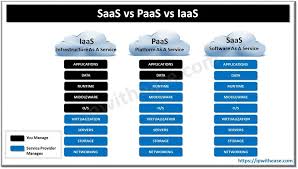

PaaS vs SaaS vs IaaS compares the three main cloud computing service models that help businesses build, deploy, and manage digital solutions efficiently. Software as a Service (SaaS) delivers ready-to-use applications over the internet, allowing users to access software without installing or maintaining it. Platform as a Service (PaaS) provides a complete development and deployment environment where developers can build, test, and launch applications without worrying about underlying infrastructure. Infrastructure as a Service (IaaS) offers virtualized computing resources such as servers, storage, and networking, giving businesses full control over their cloud infrastructure. PaaS vs SaaS vs IaaS explains the key differences between cloud service models, helping businesses choose the right platform for development, deployment, and infrastructure needs.
In today’s digital-first world, cloud computing has become the backbone of modern businesses. Companies are increasingly relying on cloud services to enhance efficiency, reduce costs, and scale operations. When exploring cloud solutions, three main service models often come up: PaaS (Platform as a Service), SaaS (Software as a Service), and IaaS (Infrastructure as a Service). Understanding the differences between them is essential for organizations seeking the right cloud strategy.
What is IaaS (Infrastructure as a Service)?
IaaS provides virtualized computing resources over the internet. Instead of purchasing physical servers, storage, or networking hardware, businesses can rent these resources from cloud providers on a pay-as-you-go basis.
Key features of IaaS include:
- Virtual Machines: Users can deploy and manage virtual servers without handling physical hardware.
- Storage Solutions: Scalable storage options to meet business needs.
- Networking: Managed networking resources, including firewalls and load balancers.
- Flexibility: Complete control over the operating system and applications.
Use Cases: IaaS is ideal for companies that require high customization, like startups launching new applications, enterprises running complex workloads, or organizations testing new software environments.
Examples of IaaS providers: Amazon Web Services (AWS), Microsoft Azure, Google Cloud Platform (GCP).
What is PaaS (Platform as a Service)?
PaaS provides a platform that allows developers to build, deploy, and manage applications without worrying about the underlying infrastructure. PaaS abstracts server management, storage, and networking, offering a ready-to-use development environment.
Key features of PaaS include:
- Application Hosting: Developers can deploy applications directly to the cloud platform.
- Development Tools: Integrated tools for coding, testing, and deployment.
- Database Management: Built-in database services for seamless data storage and retrieval.
- Middleware: Offers software that connects different applications or services.
Use Cases: PaaS is suitable for developers and software teams focusing on building applications efficiently. It’s ideal for businesses that want to speed up development and deployment while reducing operational complexity.
Examples of PaaS providers: Heroku, Google App Engine, Microsoft Azure App Services.
What is SaaS (Software as a Service)?
SaaS delivers software applications over the internet on a subscription basis. Users can access software via web browsers without installing or maintaining it on their local devices.
Key features of SaaS include:
- Accessibility: Available from anywhere with an internet connection.
- Automatic Updates: Cloud provider handles software updates and maintenance.
- Scalability: Easy to scale subscriptions according to business needs.
- Collaboration: Facilitates team collaboration with shared access to data and tools.
Use Cases: SaaS is perfect for businesses that want ready-to-use software solutions without the hassle of maintenance. Common examples include email services, CRM systems, and project management tools.
Examples of SaaS providers: Google Workspace, Salesforce, Microsoft 365, Zoom.
PaaS vs SaaS vs IaaS: Key Differences
While all three cloud models provide scalable and flexible solutions, they differ in terms of management, control, and use cases.
| Feature | IaaS | PaaS | SaaS |
|---|---|---|---|
| Control | Full control over infrastructure and OS | Control over applications; platform managed by provider | Minimal control; software fully managed |
| Management | User manages applications, data, middleware, and runtime | Provider manages infrastructure and runtime; user manages applications | Provider manages everything; user only uses the software |
| Use Case | Custom application hosting, test environments, data storage | Application development, deployment, API management | End-user software applications like email, CRM, collaboration |
| Cost Model | Pay-as-you-go for resources | Subscription or usage-based for platform | Subscription-based for software |
Understanding these differences helps organizations select the right cloud model based on their technical requirements, budget, and business goals.
Why Choosing the Right Cloud Model Matters
Selecting the appropriate cloud model is critical for optimizing costs, efficiency, and scalability.
- IaaS is best for businesses needing maximum control and flexibility.
- PaaS suits organizations focusing on application development without infrastructure management overhead.
- SaaS is ideal for teams that need instant access to ready-to-use software without worrying about updates or maintenance.
By aligning cloud strategy with business needs, companies can achieve faster time-to-market, improved productivity, and enhanced collaboration.
Conclusion
The debate of PaaS vs SaaS vs IaaS is not about which model is superior—it’s about which solution best fits your organization’s needs. Whether you need infrastructure control, development efficiency, or ready-to-use software, understanding these cloud service models empowers businesses to make informed decisions.
Adopting the right cloud model can transform operations, improve agility, and provide a competitive advantage in today’s fast-paced digital landscape.